
Workstation on site
The dedicated workstation sits on the organisation’s LAN. We install the platform and the open-weight LLMs validated by noze ® remotely, and they run locally.
From the workstation on site to signature in 5 steps, with the Reviewer before every signature.
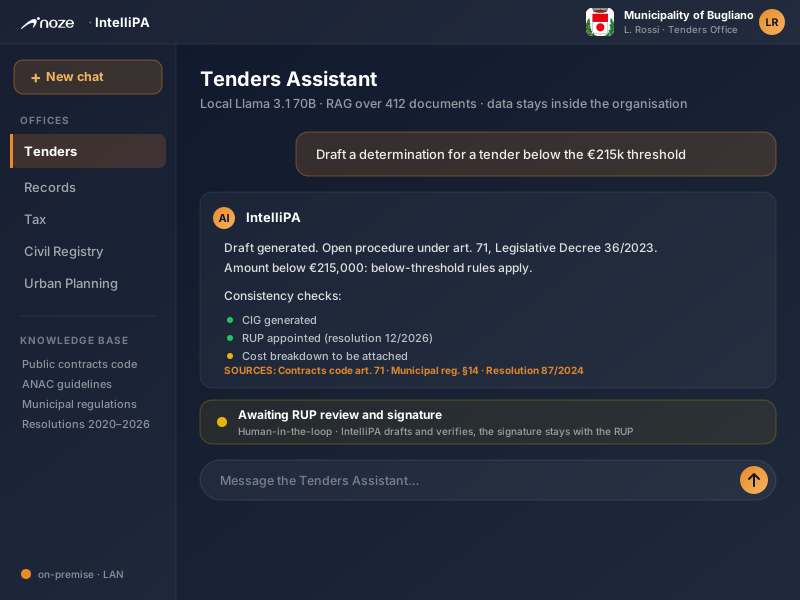
The dedicated workstation sits on the organisation’s LAN. We install the platform and the open-weight LLMs validated by noze ® remotely, and they run locally.
We connect shared folders (SMB/Windows, NFS), IMAP mail, WebDAV, S3-compatible storage and REST/JSON sources read-only. The designated contact consents to every source and credentials are encrypted.
We activate the licensed offices, each with its own templates, review rules and laws. Then we open the Console to the office’s staff.
Staff prepare drafts and query the regulations. The Reviewer reads every draft again before signature.
IntelliPA prepares and verifies. The RUP (the officer responsible for the procedure) or the manager decides, signs and takes responsibility for the act.
Everything runs on the workstation on site: the open-weight LLMs, the RAG engine that retrieves the relevant passages and the IntelliPA web Console, reachable from the LAN with nothing to install on staff PCs. The standard workstation handles up to 8 AI requests at once and queues the others. For larger organisations it is sized to the case. IntelliPA runs on Admina (the open-source governance framework) and follows the OISG paradigm.
It flags internal inconsistencies, outdated legal references, contradictions and formal errors, cell by cell in tables too.
Once the corrections are accepted, the document downloads with Word tracked changes or clean. It can also be saved to an external archive.
Every answer and every draft cites the organisation’s documents it comes from. At review you verify, you do not rebuild.
Whoever cannot read a file at the source does not see it in search, citations, versions or exports either. An unmapped permission grants nothing.
They run on a schedule or on an event, such as a new document or an approaching deadline. A person approves every change. Each automation has minimal permissions, daily limits and an emergency stop.
Additional content packs and plugins are signed and run in a sandbox.
| Approach | What it does | Where the data sits | Limit |
|---|---|---|---|
| Public cloud AI chatbot | Generates generic text | In the vendor’s cloud | Documents leave the organisation, no knowledge base on the acts, no consistency check |
| Copy and adapt a previous act | Manual reuse of a previous act as a template | Inside the organisation (manual) | Slow, propagates errors and outdated references, depends on the officer’s experience |
| External consultant or firm | Specialist drafting per project | With the external consultant | Costly, not always available, does not scale to daily volume |
| Cloud SaaS AI for the public sector | Vertical AI assistant | In the vendor’s cloud | Data leaves the organisation, depends on connectivity, recurring per-user fee |
| IntelliPA | Generative AI on site: generates, verifies, cites sources | On-premise, inside the organisation | Requires the dedicated workstation on site |